Using SAS/BASE to load CSV extracts
We will create a few SAS programs to load CSV files with dimensions data and create dynamically additional dimension tables.
Lesson assumptions and objectives:
Please refer to the comments (in green) included in the SAS program attached below.
* read customers definition from a csv file;
data customers;
infile 'D:\business_scenario\src_customers.csv' delimiter = ','
MISSOVER firstobs=2;
informat idc 8.0
informat CUST_ID $6.;
informat CUST_NAME $30. ;
informat CUST_GROUP $20. ;
informat CUST_SEGMENT $20. ;
informat CUST_COUNTRY_ID $2. ;
input ID CUST_ID CUST_NAME CUST_GROUP CUST_SEGMENT CUST_COUNTRY_ID;
idc = _n_;
* this variable will be used as a surrogate key;
drop ID;
run;
* read products definition from a csv file;
data products;
infile 'D:\business_scenario\src_products.csv' delimiter = ','
MISSOVER firstobs=2;
informat idp 8.0 ;
informat PROD_ID $7.
informat PROD_NAME $30. ;
informat PROD_NAME_ENGLISH $30. ;
informat PROD_ZONE $15. ;
informat PROD_GROUP $15. ;
idp = _n_;
* this variable will be used as a surrogate key;
input PROD_ID PROD_NAME PROD_NAME_ENGLISH PROD_ZONE PROD_GROUP;
run;
* read countries definition from a csv file;
data countries;
infile 'D:\business_scenario\src_countries.csv' delimiter = ','
DSD MISSOVER firstobs=2;
informat COUNTRY_ID $2.
informat COUNTRY_TEXT $50. ;
informat REGION_TEXT $30. ;
input COUNTRY_ID COUNTRY_TEXT REGION_TEXT ; run;
* enter manually product types;
data prodtype;
input type_id type_name $;cards;1 Seeds2 Plants;
* enter manually product age types;
data prodage;
input age_id age_name $;datalines;1 02 1-23 3-54 6-105 11-206 21-100;
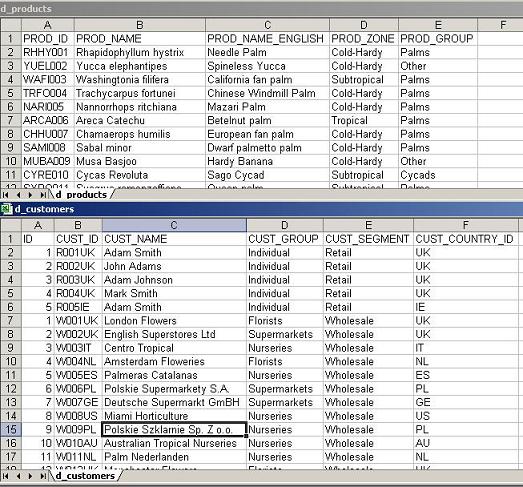
Customers and Products CSV text files contents: