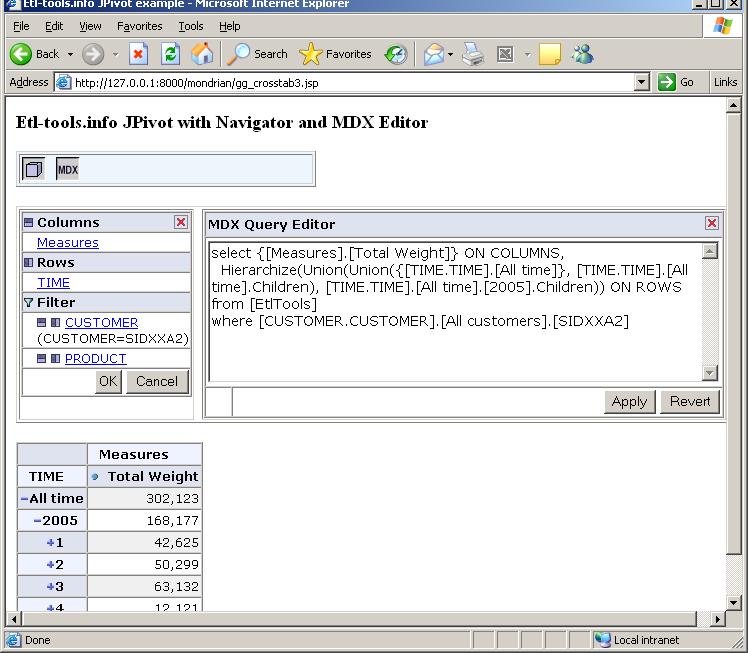
MDX editor in JPivot
The MDX query editor form is a very useful JPivot component which lets users type in MDX queries in real time and see the results in a pivot table at the same page.
Using MDX query editor is also an easy way to learn MDX query language
First we define a new form which is a WCF element.
The definition of that form is in the following XML file: /WEB-INF/jpivot/table/mdxedit.xml. We can adjust the form parameters and the design in that XML file.
  <!-- mdx editor form definition -->

  <wcf:form id="mdxedit01" xmlUri="/WEB-INF/jpivot/table/mdxedit.xml" model="#{query01}" visible="false"/>


  <!-- mdx editor form toolbar entry -->

  <wcf:separator/>

  <wcf:scriptbutton id="mdxEditButton" tooltip="toolb.mdx.edit" img="mdx-edit" model="#{mdxedit01.visible}"/>


  <!-- render MDX editor -->

  <c:if test="${mdxedit01.visible}">

    <td valign=top>

    <wcf:render ref="mdxedit01" xslUri="/WEB-INF/wcf/wcf.xsl" xslCache="false"/>

    </td>

  </c:if>
JPivot with the navigator and MDX query editor: